Docusaurus to PDF with Rust

I write all my courses with Docusaurus, a tool that I love:
- everything is written in Markdown/MDX, so it’s easily portable if needed
- I can easily organize the chapters in the order I want, table of contents is auto-generated
- thanks to the plugin system, I was able to easily integrate a search engine into the courses (I even tested with Algolia, it’s pretty good)
- Docusaurus is based on React, so I created custom components that I then integrated into my courses: end-of-chapter quiz, integrated code editor…
- Since version 3.6 and the use of Rspack, SWC and Lightning CSS, build times have been greatly reduced, that’s a real pleasure
One day, in class, a student asked me if he could have my course in PDF version.
Searching for a tool
The first thing I did to answer his request was to look online for a tool.
I thought there would be a tool available on NPM to convert a Docusaurus website to PDF or a set of PDF files, and that I would just need to execute it with npx.
After testing two tools, and experiencing two failures, I decided to write my own.
Requirements
The requirements I had were the following:
- Use the tool from the command line
- Pass the URL and, optionally, an output directory for the PDF files
At the level of the script:
- Make a request to a web page
- Analyze the content of a web page
- Generate a PDF from a web page
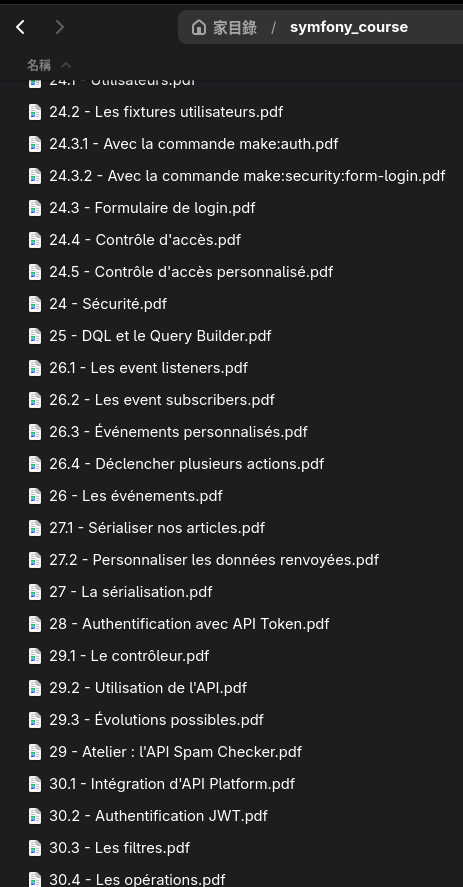
- Generate a PDF for each menu item (numbered)
The tool
Rust
I decided to use Rust to write this tool. It’s a language that I really like, and I thought it was quite suited for this case.
To retrieve the web pages, I used the chromiumoxide library, which allows me to launch a headless browser, navigate to web pages, inspect their elements, and then export a web page as a PDF.
Multi-threading
I generate one PDF file for each menu item.
Initially, I generated the PDF files sequentially, chapter by chapter. For more speed, I decided to create one thread per page, that I execute in parallel. It may not hold as well on websites with hundreds and hundreds of pages (it would probably require a threshold with a delay in thread creation at some point), but in my case I’m not there yet: it works, and it works pretty fast.
Result
The different steps of the script are the following:
- Retrieve a headless browser from chromiumoxide, and create a page that I will use to navigate (starting from the main page of the documentation)
- Collect the chapters (label and URL)
- Generate each chapter in PDF in the output directory
#[async_std::main]async fn main() -> Result<(), Box<dyn Error>> {    let start = Instant::now();    let args = Args::parse();
    let (mut browser, handle) = browser::get_browser_and_handle().await?;    let base_url = util::get_base_url(&args.initial_docs_url);    let page = browser::get_new_page(&browser, true).await?;    page.goto(&args.initial_docs_url).await?;
    println!("Collecting chapters...");    let main_side_menu = page.find_element(".theme-doc-sidebar-menu").await?;    let chapters = docusaurus::collect_chapters(&main_side_menu, None).await?;    println!("Chapters found: {:?}", chapters.len());
    println!("Generating PDF files in {}...", args.output_dir);    fs::create_dir_all(&args.output_dir)?;    pdf::generate_pdfs(&chapters, &browser, &base_url, &args.output_dir).await?;
    println!("Done in {:.2?}", start.elapsed());
    browser.close().await?;    handle.await;    Ok(())}
Integration in NixOS
I’m using NixOS, so I can save all my configuration online.
- Their declarative configuration system allows me to have everything in the same place and save it: if I lose my machine, I can quickly reproduce my system on a new machine
- To update my system and my programs, I execute a command that creates a new generation: if there is any problem, I can easily go back by selecting a previous generation in the boot menu
- At the time of writing, more than 120 000 packages are available on NixOS: when I want to install a new program, I add it to my configuration file and I rebuild
- Each Nix release is stable: updates are security or major bug fixes. If I still want to update some programs without the new version having been validated for a Nix release, I subscribe to the
unstablechannel for these programs nix-shellallows me to launch a new shell in a new temporary environment. It is useful to test tools, or also to have a temporary environment with a precise version of a language, if needed
I still have a lot to discover in the Nix ecosystem, but in this case, I was able to create a package that I then loaded into my configuration: the tool is installed as a normal executable in my distribution.
In my configuration (environment.systemPackages) :
(callPackage ./dcsrs-to-pdf/default.nix {})The package is located next to the configuration file: Nix retrieves the Rust toolchain, compiles the script, installs it and makes it available anywhere on my system: I can use my script as a normal program.